
Whoever you are in the nursery, OperoNMS starts with your day.
Each role has its own menu and its own Home page. Each kind of nursery sets OperoNMS up its own way. And every common nursery headache has a place in the system where it gets solved.
A day in OperoNMS, role by role.
Three menus: the full desk, a research menu and the customer portal. Floor teams work on the tablet; on the web, General Workers and Assistant Supervisors see only Home. Roles can be granted for one nursery, several, or the whole group, read-and-write or read-only.
Runs one nursery: recipes, plans, orders and approvals.
Releases plans, accepts orders, approves write-offs and dispatch under concession. Disposes of unfit batches and retires hedges.
Morning: Home reminders (7 proposals late, 4 dispatches to deliver), orders to accept. Monday: production plan and space utilisation. Friday: decide holds and write-offs. Month end: dashboard and surplus board.
Gets the work done, and checks it.
Places new phases on beds, prints the weekly set-up list and tunnel sheets, and runs inspections. Assistant supervisors work on the floor tablet; on the web they see only Home.
Morning: out with the tablet to scan and count. Monday: set-up list, place phases. Before dispatch: inspect batches due within two weeks. Month end: hedge cut records complete.
Every nursery, one view, and the decisions only you make.
The divisional manager owns the nursery group: switches on and publishes the annual order cycle where the group uses one, adjusts prices and administers users. The general manager releases batches and approves write-offs across all nurseries.
Weekly: dashboard for all nurseries, executive view. Order round: set the cycle's dates, follow progress. Month end: write-offs and the surplus stock board.
Keeps the records straight, and the trucks moving.
Clerks enter phone and email orders, capture records and run reports; they commit the nursery to nothing. Dispatch clerks pick against allocations, build the load and prepare the dispatch; whether they may also confirm it is set per customer.
Morning: delivery requests to deliver, overdue dispatches. Monday: truck & trolley planner. Dispatch day: pick, load, delivery note. Friday: receive and wash trays, count tray stock. Month end: export tray charges.
Scan, count, load. That's it.
General workers use the tablet on a shared, enrolled device, with no personal account. Count stock, look up a bed, record a loss, load a truck. With no signal, the tablet carries on. On the web, General Workers see only Home.
Try the tablet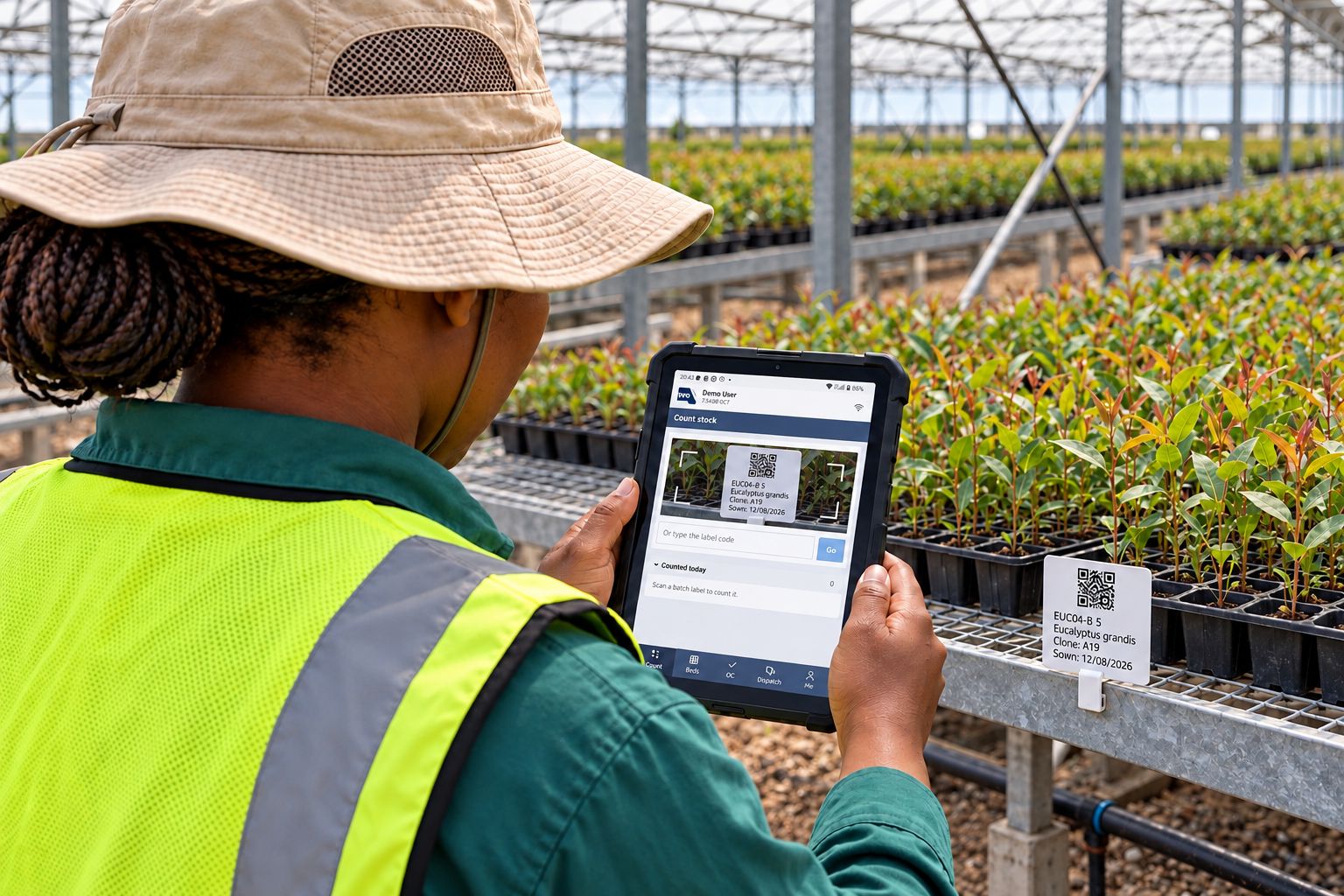
Orders, deliveries and trays, without a phone call.
Foresters order for their own compartments and see availability; they cannot see prices or other people's orders. External customers order for their business, follow orders and deliveries, and ask for delivery or a hold.
Tour the portalRecipes, species and seed, nothing else.
A research menu with production profiles, the profile repository, seed lots and species. Researchers improve recipes from actuals feedback without touching nursery operations.
Accounts, roles, sessions and connectors.
Technical administration without access to pricing or business data. The integration administrator manages connectors and their credentials, and is given to nobody by default.
Set up the way your nursery grows.
Forestry seedlings & clones
Pine, eucalypt and wattle for your own plantations and outgrowers. Compartment-driven orders, an optional annual projected → adjusted → actual order cycle, mother hedges and cutting supply, dispatch specifications by height and root-collar diameter, returnable trays and cost-centre recharges.
Vegetable & herb seedlings
Weekly sowings on three-to-six-week cycles. Distribution models spread a season across the weeks, germination houses fill and empty fast, and sales availability tells growers' customers what they can still order this week.
Macadamia & grafted trees
Trees that spend a year or more in the nursery. Each step is a phase in the recipe: rootstocks from seed, grafting, healing, growing on and hardening off, each with its own weeks, space and expected loss, so your graft take decides how many rootstocks to sow. Every batch carries its cultivar, bed space is planned as trees are potted on, and orders for next year's planting are matched to trees still growing.
Pot & bedding plants
Many varieties, seasonal peaks and retail customers. Recipes with seasonal timing, space by tray and pot size, the customer portal for garden centres and landscapers, and, on request, ePOS sales against availability.
Trees & shrubs
Long crops across several phases and potting-on steps. Phase-by-phase space, batches traced from cutting or seed lot, and inspections against your own grade specifications.
Cut flowers & young plants
Stock plants harvested for cuttings, rooting batches planned against weekly harvests, and quality checks before every dispatch.
Multi-site groups
Several nurseries, one system. Orders routed to the nearest nursery, a surplus stock board between them, group-wide roles and one dashboard across all sites.
Small & family nurseries
Start with the Production Planner and Space. No servers, no IT department, setup done with you. Add orders, dispatch and the tablet when you are ready.
Contract growers
Grow to customers' orders with batches linked to the order, customer-specific specifications and concessions, and a portal where they follow their own crop.
The headache, and where OperoNMS fixes it.
| The problem | What OperoNMS does | Where |
|---|---|---|
| We find out too late that an order is short | A daily order-cover check proposes a batch while there is still time to sow, with the sow-by date | Proposals |
| The hardening camps overflow every spring | Space booked for every phase, week by week, and a heat table of overbooked weeks months ahead | Space utilisation |
| Our recipes are in one grower's head | Versioned growing recipes with phases, timing and materials, improved from actuals | Recipes |
| Stock figures are a guess | Counts and losses on the tablet, with reasons and photos, recalculating the plan | Floor tablet |
| We lose thousands of trays a year | A tray ledger per nursery and tray type, trays with customers by age, and charges | Tray ledger |
| Customers phone all day | A portal for orders, delivery requests, holds, deliveries, receipts and tray returns | Portal |
| Below-spec plants reach customers | Inspections against versioned specifications; failed batches blocked from dispatch | Quality |
| One nursery writes off what another is short of | A surplus stock board across the group, delivered straight to the claimant's customer | Surplus board |
| We can't answer "where did this batch come from?" | A trace from seed lot or hedge to the customer who received it | Traceability |
| The board wants numbers we don't have | More than 70 measures, Excel workbooks and scheduled reports | Dashboards |
Be one of our first pilot nurseries.
We work closely with a small group of nurseries to set up OperoNMS on their sites. You get hands-on setup and training, your own nursery's layout and recipes loaded with you, and a direct say in what we build next.